> For the complete documentation index, see [llms.txt](https://v2.dataos.info/llms.txt). Markdown versions of documentation pages are available by appending `.md` to page URLs; this page is available as [Markdown](https://v2.dataos.info/data-product-journey-v2.md).
# Data Product Journey
From business question to trusted consumption
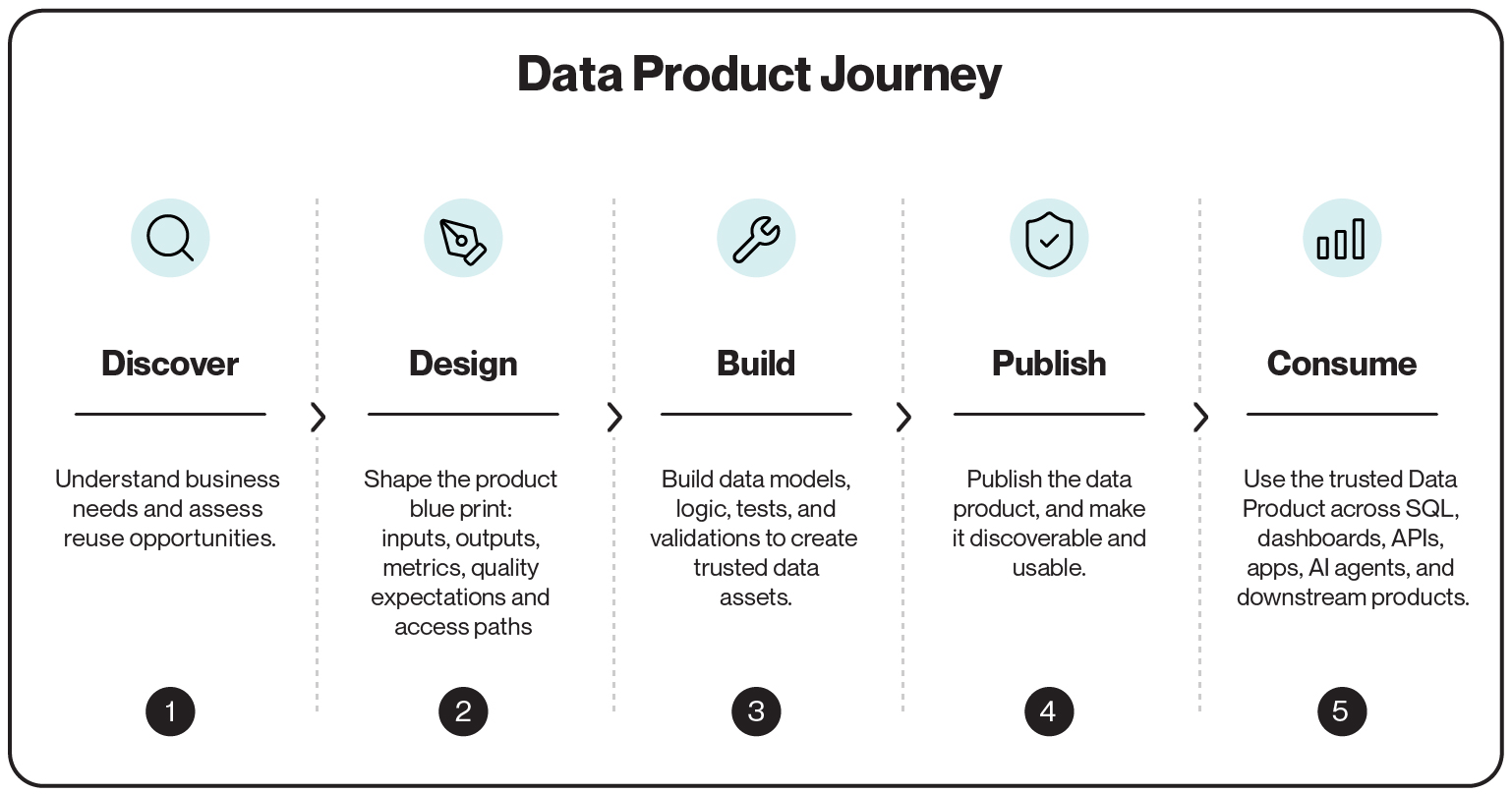
This page follows a single business question from a vague request to a governed Data Product, using one worked example. It makes the three stages from the home page concrete: **Discover**, **Productize**, and **Consume**. Productize is shown in the detail it deserves, as three steps: Design, Build, and Publish.
The example is an **Orders Analytics** Data Product. A business team needs to answer order and revenue questions and trust the answers across reporting, applications, and AI:
* How much revenue did we generate yesterday?
* Are order volumes rising or falling?
* Can these numbers be trusted for a board report?
* Can the same definitions power dashboards, APIs, and AI agents?
{% hint style="info" %}
The point of the journey is the shift in unit. You stop shipping a table and start shipping a product that carries its own ownership, semantics, quality rules, lineage, and consumption paths. The table is an output of the work, not the deliverable.
{% endhint %}
***
## The journey at a glance
The journey runs in two directions. You reason about it from the consumer backward, and you build it from the source forward.
```
Think right-to-left: start from the business outcome, then shape the contract
Build left-to-right: create the artifacts, then deliver a trusted product
```
Designing from the consumer backward is what keeps the product purpose-built. You decide what question it answers before you decide what tables it needs.
***
## 1. Discover: do we already have this?
Start by assuming the work may already be done. Discovery checks whether a trusted Data Product, dataset, metric, or perspective already answers the orders question before you build anything new.
1. **Check what exists.** Search the catalog for an orders-related Data Product, dataset, or metric.
2. **Inspect what you find.** Review its metadata, schema, lineage, ownership, and sample data.
3. **Decide the next step.** Reuse it, extend it, or bring in the missing source data.
This step is what makes complexity grow additively instead of multiplicatively. A new question reuses an existing product rather than starting another pipeline from zero.
> By the end of Discover, you know whether to reuse an existing asset, extend available data, or build a new Orders Analytics Data Product.
## 2. Design: write the contract before the pipeline
Design turns a business need into a published contract. You decide what the product promises before you write logic to fulfill it. This is the contract-first discipline from the home page, applied to one product.
#### Consumers first
Decide who reads the product and how. Orders Analytics serves analysts, BI users, applications, and AI agents, and they all read the same order and revenue logic instead of each rebuilding it.
#### Boundaries
State what is in scope and what is not. Orders Analytics may include orders, order items, customers, products, and payments, and exclude marketing, inventory, and support data unless a consumer needs them.
#### Trust and reuse
Declare how the product earns trust: quality rules, freshness and completeness checks, shared semantic and metric definitions, a named owner, and the consumption paths it supports.
The blueprint translates these choices into the building blocks of the product:
> By the end of Design, you have a product contract. You know what Orders Analytics includes, what it promises, how it is trusted, and how it is consumed, before any build logic exists.
## 3. Build: create the artifacts with Vulcan
Build is where the contract becomes working code. Use Vulcan to define, validate, and test the artifacts locally before anything reaches the warehouse. You turn raw inputs into trusted models, quality gates, and metrics.
* **Source configuration** defines where the input data comes from.
* **Models** turn raw inputs into business-ready data.
* **Source models** structure the source data.
* **Transformed models** clean, join, and reshape data.
* **Semantic models** map technical fields to business concepts.
* **Quality gates** validate the logic and block bad data before it moves forward.
* **Tests** check the transformation logic against mock data before touching the warehouse.
* **Assertions** block bad records, such as null required fields, duplicate order IDs, or negative revenue.
* **Data quality checks** monitor completeness, freshness, and unexpected drift.
* **Metrics** combine measures with dimensions and time, such as revenue and average order value.
Quality runs here, in the build, not as an alert after release. A failing check blocks publication.
> By the end of Build, you have a tested Vulcan project with models, quality gates, semantic definitions, and metrics, ready to publish.
## 4. Publish: make it governed and discoverable
Publishing deploys the validated product to DataOS so others can find, trust, and consume it. The local build becomes a governed product in the catalog, with its contract, lineage, and quality state attached.
> By the end of Publish, Orders Analytics is no longer a local build. It is a governed product that users and systems can discover, trust, and consume.
## 5. Consume: one product, many paths
A Data Product earns its name when people and systems read it. Orders Analytics serves several consumption paths from the same governed product, and they all resolve to the same definitions.
Analysts query it with SQL. Business users explore its metrics and dashboards. Developers call it through APIs to power applications. AI agents read its governed context instead of guessing at tables. Other teams reuse it as an input to downstream products.
> The logic is defined once and reused across every path. That is what removes the drift the home page describes: there is one definition, not four copies on four schedules.
### The point of the journey
A vague question about yesterday's revenue became a governed product that analysts, applications, and AI agents all read the same way. At no point was the table the goal. Discover, Design, Build, Publish, and Consume all treated the table as a byproduct and the product, with its ownership, semantics, and quality rules, as the actual deliverable.
The next business question follows the same path, and because Orders Analytics now exists as a trusted product, most of that next question won't start from zero.
### **Next steps**
* [For Builders](https://v2.dataos.info/build): Build the Orders Analytics product end to end.
* [For Consumers](https://v2.dataos.info/consume): Consume a product across SQL, APIs, BI, and agents.
* [For Operators](https://v2.dataos.info/operate): Operate products with ongoing trust, quality, and governance.
---
# Agent Instructions
This documentation is published with GitBook. GitBook is the documentation platform designed so that both humans and AI agents can read, navigate, and reason over technical content effectively. Learn more at gitbook.com.
## Querying This Documentation
If you need additional information that is not directly available in this page, you can query the documentation by asking a question.
Perform an HTTP GET request on the following URL with the `ask` and `goal` query parameters:
```
GET https://v2.dataos.info/data-product-journey-v2.md?ask=&goal=
```
`ask` is the immediate question: it should be specific, self-contained, and written in natural language.
`goal` is what the user is ultimately trying to achieve, the reason they need the answer. Sharing it helps GitBook give you a better, more relevant answer. A goal is most helpful when it describes the outcome the user wants rather than restating the question. For example, with `ask=how do I create an API token`, a goal like `automate deployments from our CI pipeline` lets GitBook tailor the answer to that use case.
The response will contain a direct answer to the question and relevant excerpts and sources from the documentation.
Use this mechanism when the answer is not explicitly present in the current page, you need clarification or additional context, or you want to retrieve related documentation sections.
.png?alt=media)
.png?alt=media)
.png?alt=media)
.png?alt=media)