> For the complete documentation index, see [llms.txt](https://v2.dataos.info/llms.txt). Markdown versions of documentation pages are available by appending `.md` to page URLs; this page is available as [Markdown](https://v2.dataos.info/references/interfaces/ai-activation.md).

# AI activation

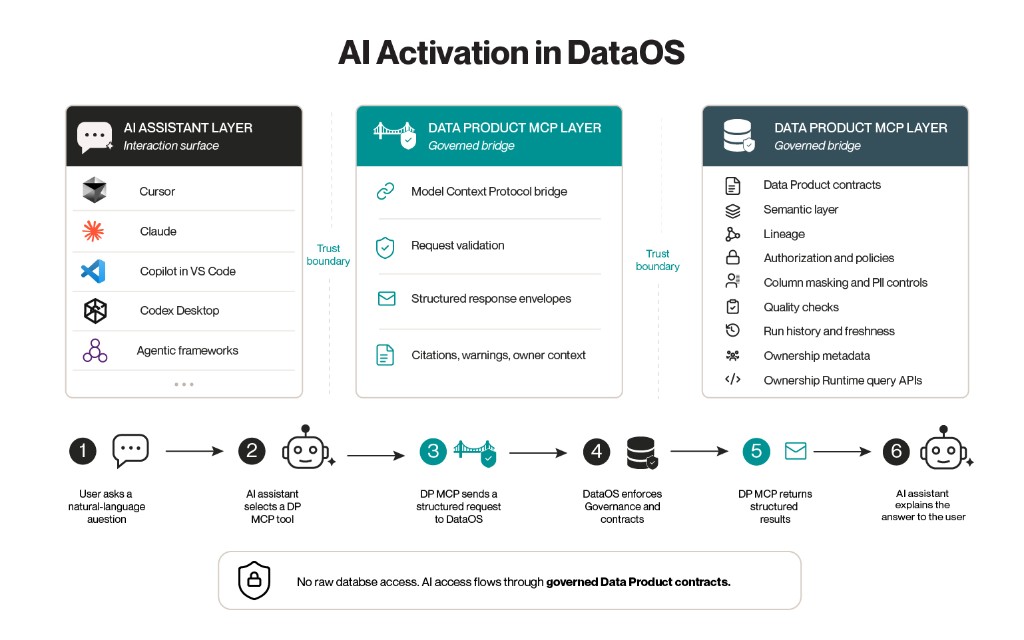
AI activation is the DataOS pattern for making governed Data Products usable through AI assistants and agentic applications. It lets users ask questions, inspect Data Products, and speed up Data Product design from the assistants they already use.

DataOS continues to enforce the same contracts, authorization, semantic definitions, quality rules, lineage, and ownership metadata.

<figure><img src="/files/hVYdx5tpWqimRGbS3hyJ" alt=""><figcaption></figcaption></figure>

AI activation is delivered through Data Product MCP. Data Product MCP is the MCP server where Data Product tools are hosted so AI assistants can build, discover, inspect, and consume governed Data Products.

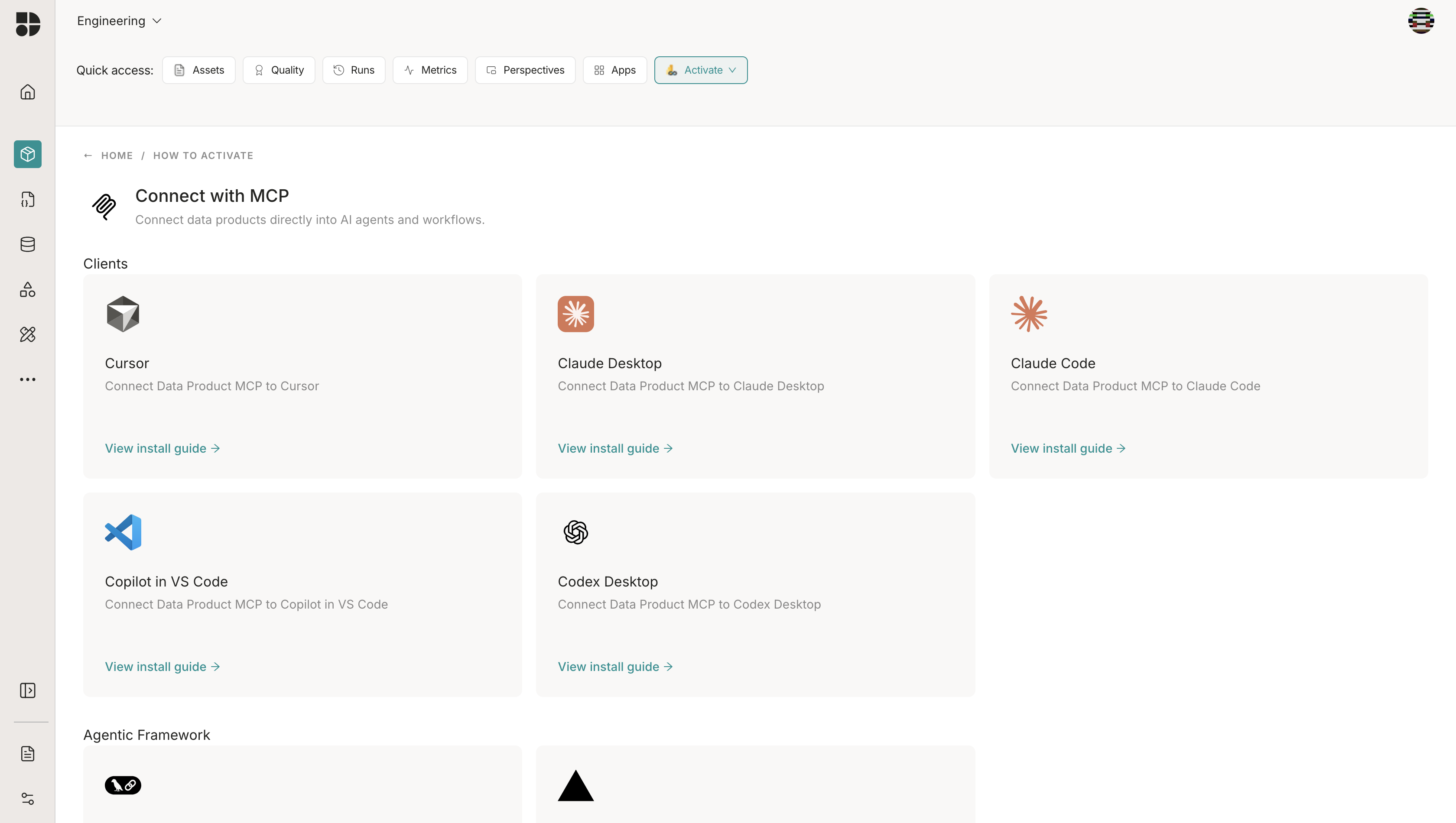
From a Data Product, select **Activate → MCP** to open the **Connect with MCP** page. That page lists the supported AI clients and agentic frameworks.

<figure><img src="/files/PdTZ9VlsJePl7H8ffUDn" alt=""><figcaption><p>The Connect with MCP page lists supported AI clients with install guides.</p></figcaption></figure>

## What AI activation solves

AI activation gives users a natural-language entry point to governed data without creating a separate, ungoverned access path.

It also helps builders move faster. A Data Product owner or analytics engineer can use the same AI surface to explore the catalog, reason through a design, scaffold a project, and validate generated artifacts against DataOS conventions.

AI activation supports two primary journeys:

| Journey                         | User                                                     | Outcome                                                                                |
| ------------------------------- | -------------------------------------------------------- | -------------------------------------------------------------------------------------- |
| Consume governed data           | Business users, analysts, managers, and operations teams | Ask questions, find Data Products, inspect trust signals, and identify owners.         |
| Build and operate Data Products | Data Product owners, analytics engineers, and developers | Design, scaffold, validate, and operate Data Products with assistant-guided workflows. |

## What is in this section

<table data-card-size="large" data-view="cards"><thead><tr><th>Title</th><th data-card-target data-type="content-ref">Target</th></tr></thead><tbody><tr><td><strong>MCP components</strong><br>Understand the host, client, server, tools, resources, and prompts used in AI activation.</td><td><a href="/pages/KXBMA86Jk8tsVEUv2zhj">/pages/KXBMA86Jk8tsVEUv2zhj</a></td></tr><tr><td><strong>MCP layers</strong><br>See how MCP separates the data layer from the transport layer.</td><td><a href="/pages/fqLx1BeoKeMcM4WYjjTB">/pages/fqLx1BeoKeMcM4WYjjTB</a></td></tr><tr><td><strong>Data Product MCP lifecycle</strong><br>Follow initialization, operation, and shutdown in an MCP session.</td><td><a href="/pages/aERQOfMnG9fwijsRsRf8">/pages/aERQOfMnG9fwijsRsRf8</a></td></tr><tr><td><strong>Request flow</strong><br>Trace how a user prompt becomes a governed tool response.</td><td><a href="/pages/PJad2VR1RHhIzZMN3cYR">/pages/PJad2VR1RHhIzZMN3cYR</a></td></tr><tr><td><strong>Authentication and authorization</strong><br>Understand how Data Product MCP enforces DataOS identity and access controls.</td><td><a href="/pages/5o1QcVPRJWtsVAohrfBm">/pages/5o1QcVPRJWtsVAohrfBm</a></td></tr><tr><td><strong>Data Product MCP tools</strong><br>Review the available tools for discovery, querying, trust checks, and builder workflows.</td><td><a href="/pages/iGy4nqnqDUTgZ0zhnLK8">/pages/iGy4nqnqDUTgZ0zhnLK8</a></td></tr><tr><td><strong>Consumer journey</strong><br>See how AI activation helps users find, trust, query, and act on governed Data Products.</td><td><a href="/pages/Qia6ELOR4vao00E0PIFf">/pages/Qia6ELOR4vao00E0PIFf</a></td></tr><tr><td><strong>Builder journey</strong><br>See how AI activation supports design, build, validation, and operation of Data Products.</td><td><a href="/pages/vogWc8VSQPAKWx1s40lA">/pages/vogWc8VSQPAKWx1s40lA</a></td></tr><tr><td><strong>Trust model</strong><br>Understand the governance and assistant trust boundaries in AI activation.</td><td><a href="/pages/Zvfn5eE7V82llmN8PEda">/pages/Zvfn5eE7V82llmN8PEda</a></td></tr></tbody></table>

## Key idea

Data Product MCP gives an AI assistant a governed interface to Data Products. It does not grant direct database access.

When a user asks a question, the assistant calls named MCP tools with defined inputs, outputs, and boundaries. The Data Product remains the system of record for semantics, contracts, policies, quality, lineage, ownership, and runtime access.


---

# Agent Instructions
This documentation is published with GitBook. GitBook is the documentation platform designed so that both humans and AI agents can read, navigate, and reason over technical content effectively. Learn more at gitbook.com.

## Querying This Documentation
If you need additional information that is not directly available in this page, you can query the documentation dynamically by asking a question.

Perform an HTTP GET request on the current page URL with the `ask` query parameter, and the optional `goal` query parameter:

```
GET https://v2.dataos.info/references/interfaces/ai-activation.md?ask=<question>&goal=<endgoal>
```

`ask` is the immediate question: it should be specific, self-contained, and written in natural language.
`goal` is optional and describes the broader end goal you are ultimately trying to accomplish on behalf of the user. GitBook uses it to tailor the answer towards what is most useful for that goal.

The response will contain a direct answer to the question and relevant excerpts and sources from the documentation.

Use this mechanism when the answer is not explicitly present in the current page, you need clarification or additional context, or you want to retrieve related documentation sections.
